How do I require approval before a ticket can be solved in Zendesk?
You do not set anything up for this, it is built in. Any ticket with an Approve approval pending on it cannot be solved: an agent who tries gets a Cannot solve ticket with an approval request pending error at the top of the screen. Just put an approval on the ticket and the solve gate is enforced for you until it is granted.
How it works
- Put an approval on the ticket. See how to create an approval, whether it is added automatically by a trigger or manually by an agent.
- While that approval is Pending, the ticket is locked from solve. If an agent tries to solve it, Zendesk shows Cannot solve ticket with an approval request pending at the top of the screen.
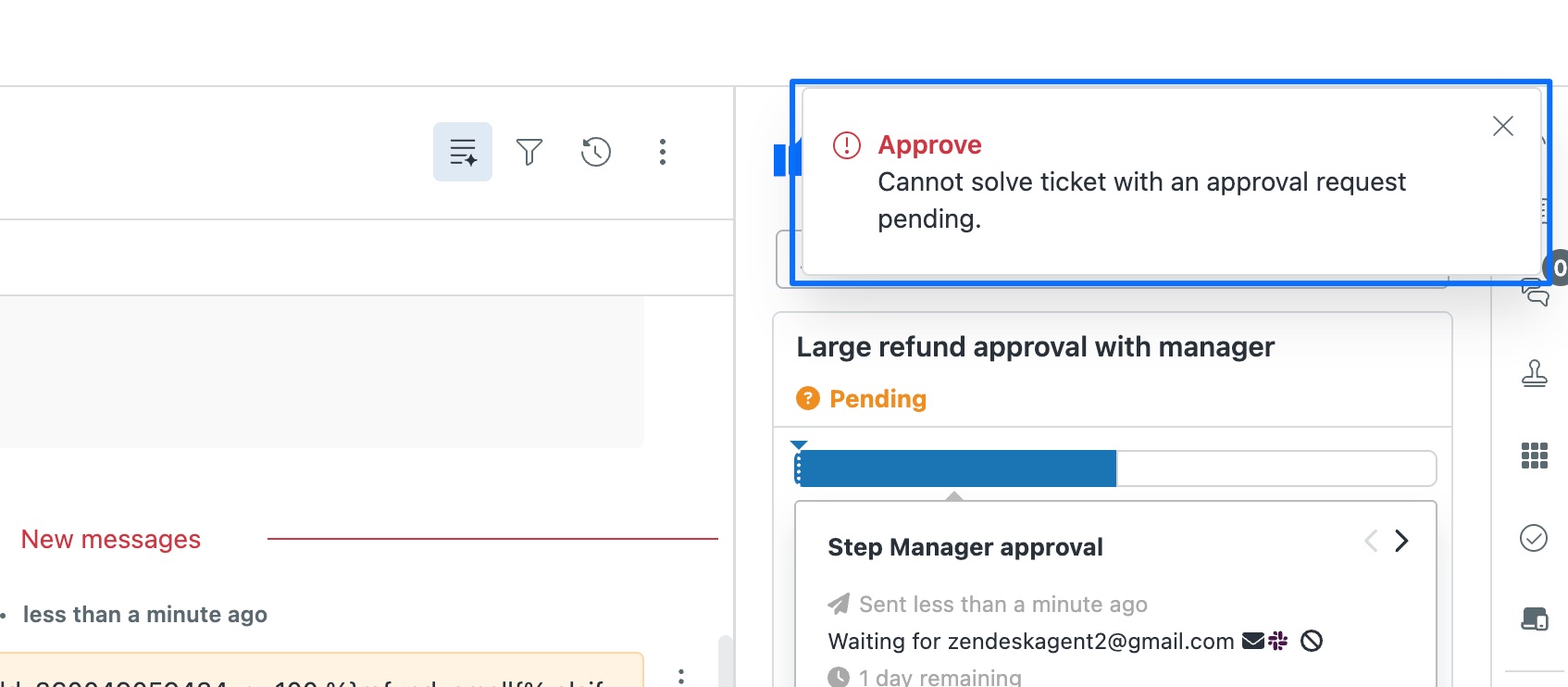
- Once the approval is granted (or declined or cancelled), the gate lifts and the ticket can be solved as normal.
An approval is only a control if it actually blocks the close. Because Approve keeps the ticket locked while a request is pending, it stays open until the right person signs off, so nothing gets solved on trust and then unpicked later. There is nothing extra to switch on.
The quickest way is the SweetHawk Suite: one click installs Approve and the rest of the suite into your account, with a free trial and no credit card. You can also install Approve on its own from the Marketplace.

How this compares to native Zendesk
Zendesk's native approvals can gate solve in limited ways on some plans, but not with unlimited multi-step or parallel approvers, external sign-off, timeouts or escalation. Approve enforces the gate across all of those.
See how native Zendesk and Approve compare, feature by feature →