New

Project management in Zendesk
Run projects as tickets. Break the work into subtasks, arrange them as a tree, and see the plan on a Gantt chart, all inside Zendesk.
Free
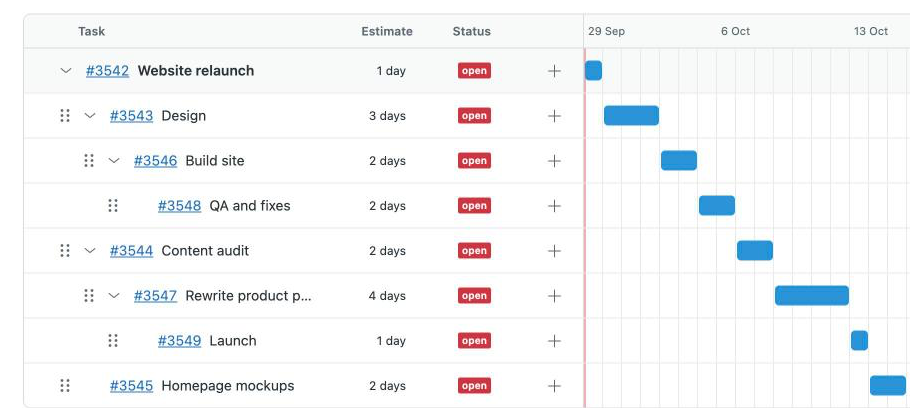
Run projects where the work already happens
An office move. A new system rollout. A website relaunch. Big pieces of work usually end up in a spreadsheet or another tool, away from the tickets your team works in every day. Project Manager keeps them in Zendesk. A project is a ticket, and every task in it is a ticket too, so the work is assigned, tracked and reported on like everything else.
- Projects and subtasks as tickets: start a project in one click, then break it into subtasks, and subtasks into their own subtasks, as deep as you need.
- Drag and drop: re-arrange the project by dragging a task onto another. The same moves work from the keyboard.
- Gantt chart built in: give tasks an estimate in days and the timeline lays them out one after another. A task without its own estimate shows the total of the tasks under it.
- Works from the ticket too: the ticket sidebar shows which project a ticket belongs to and its subtasks, lets you add one, and can turn any ticket into a project.
- For every agent: anyone can create projects and subtasks. Only the setup needs an admin.
Office move
Office move
6 days
Order desks and equipment
2 days
Set up network and printers
3 days
Test access cards
1 day
What setup involves
Project Manager uses two ticket fields, Parent Ticket ID and Project Ticket ID, to record where each ticket sits. An optional Duration estimate field turns on the Gantt chart. Nothing is created until an admin confirms.
Free, no credit card required
What you get from SweetHawk completely changes what Zendesk can do for you.

Every time we've needed to extend the functionality of Zendesk, SweetHawk apps have been there.

The SweetHawk integration was very straightforward and allowed a high level of customization. We now have the power to determine what apps are needed for each specific group within MongoDB.