
New: Share things with people outside of Zendesk
Boards, reports and lists, for anyone with an email address.
October 6, 2026
A manager wants to see the board. Finance wants last quarter's approvals. Neither of them lives in Zendesk, and neither of them is going to be handed an agent seat just to look at one page.
So you take a screenshot. Or you export a CSV, email it over, and by Thursday it's out of date and they're asking again.
That's the gap this closes. You can now give someone outside Zendesk a link to the real thing inside your SweetHawk apps: the actual board, the actual report, as current for them as it is for your own team. No app to install, no agent seat, and nothing to send again the next time they wonder how it's going.
What you can share
Four things today, each from the app it lives in.
| Share | They get |
|---|---|
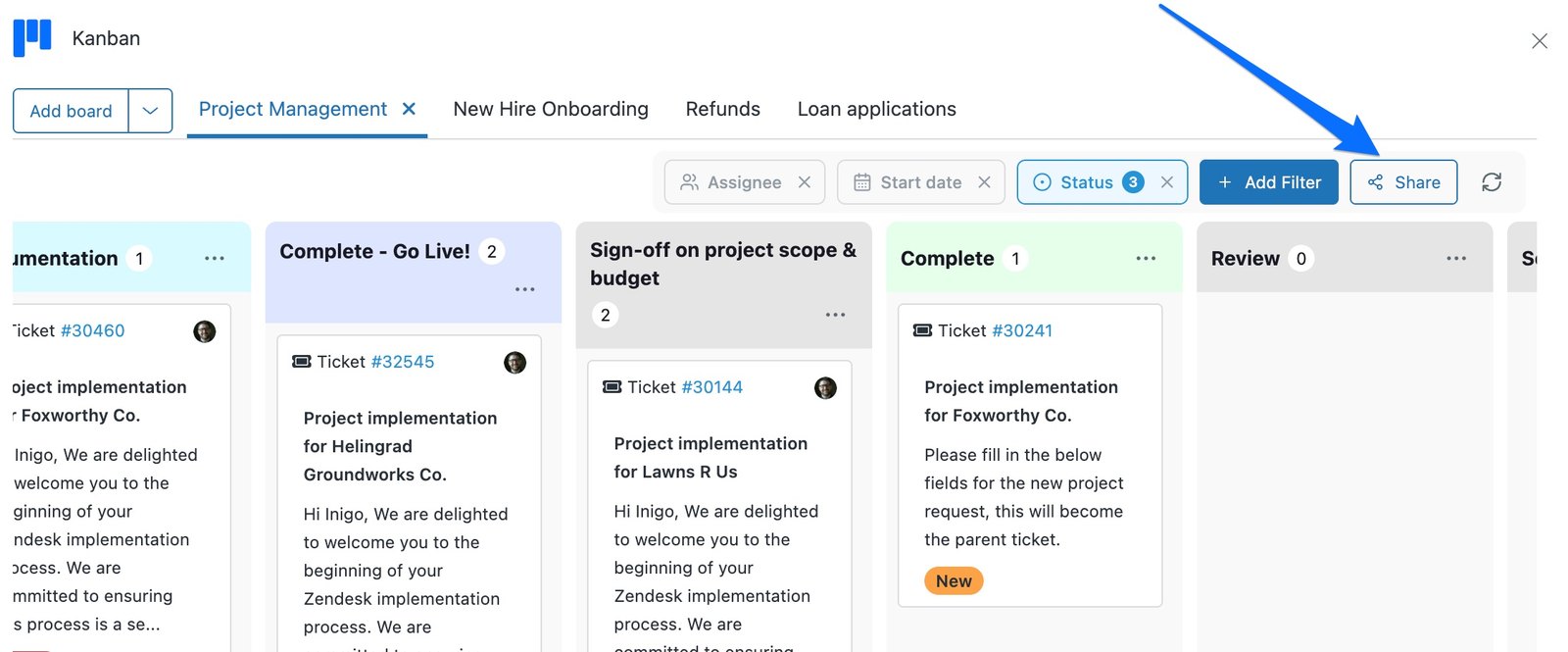
 Kanban board
|
That board, full screen |
 Survey reports
|
Every report, plus the responses behind them |
 Approvals history
|
Who asked, who approved, when. Filters and CSV export included |
 Future tickets
|
What's scheduled, past and future, with search and date filters |
That's the list as it stands, and it's growing. If there's something else in SweetHawk you keep wishing you could put in front of someone, tell us what it is.
What it looks like for them
Refreshingly ordinary, which is the point. They get an email from you with a link in it. They confirm it's really them, and then they're looking at the thing itself, read-only, in your branding, in whichever theme their machine prefers.
Share more than one thing with the same person and they get a Shared with you page with the lot on it, so nobody has to dig through old emails to find the right link.
You stay in control
Handing something to someone outside your team is only comfortable if you can see what you've handed out, and take it back.
- The Share button tells you who already has it, as a row of initials and a count, so you can tell at a glance whether a board is private or half the leadership team is on it.
- You can see who has actually opened it, and when they last looked. Handy when you're wondering whether that report is being read or quietly ignored.
- Anyone can be removed whenever you like. Access is checked on every request, so it ends the moment you click, not whenever their session happens to expire.
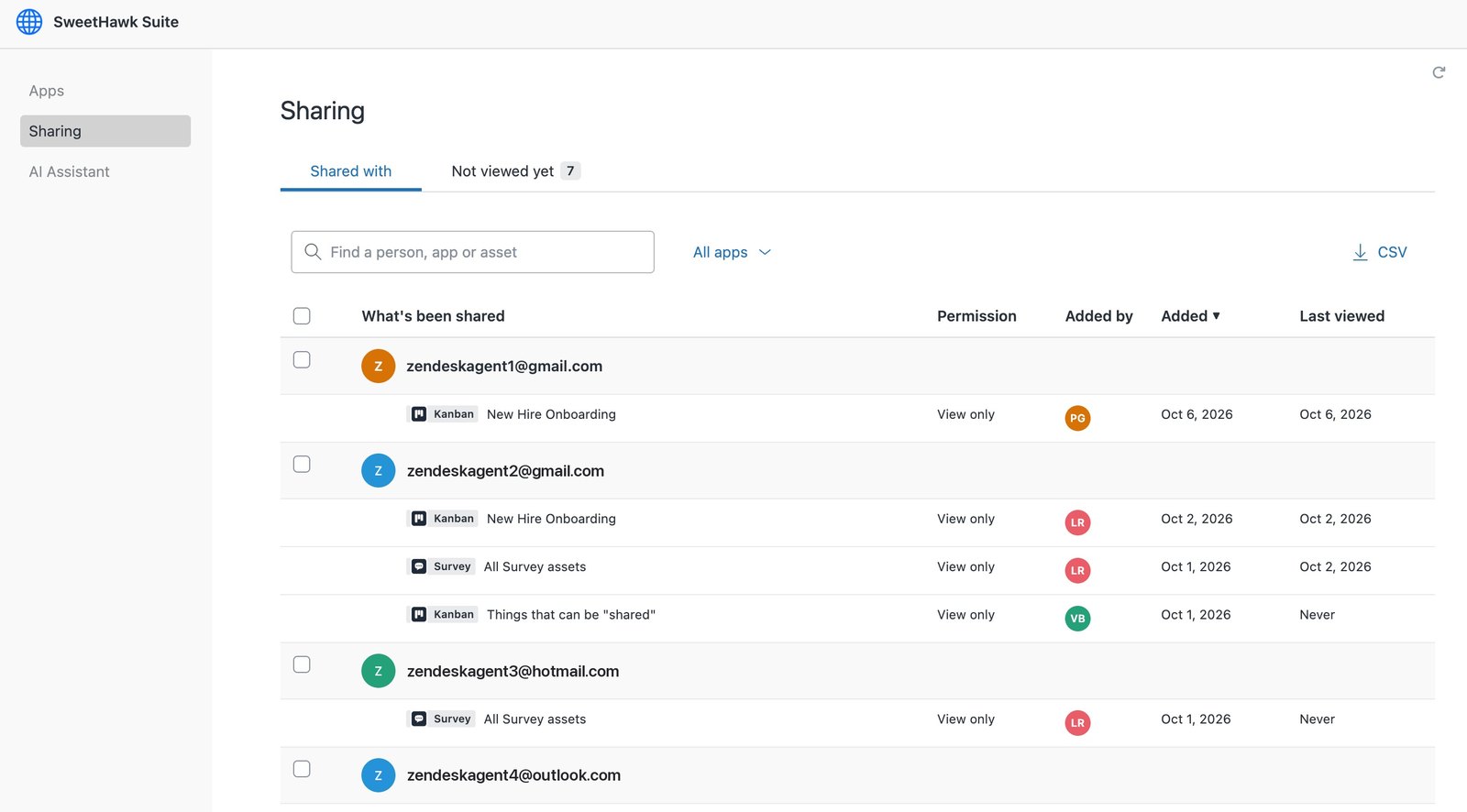
For the whole picture, the SweetHawk Suite app has a Sharing page: everything your account has shared, in one list. Each person, what they have been given, who gave it to them, when, and whether they've opened it yet. There's a tab for the people who haven't looked, a search, a filter by app, and a CSV export, and you can tick a few names and remove them in one go.
This is the page you open when someone leaves the company, or when an auditor asks who can see what.
How access actually works
Sharing puts your data in front of people outside the app, so the defaults are deliberately tight. Everything shared is read-only, so nobody can change anything through a shared link. There aren't any public or anonymous links either: a link only works for an email address you've added, which means forwarding it to a colleague gives them nothing at all. The sign-in page answers the same way whether or not an address has access, so it can't be used to work out who you've shared with.
Recipients see the page and nothing behind it. A shared page sends only the fields it displays, with no extra ticket data riding along in the background, and the Survey export leaves respondent IP addresses out even though the admin export includes them. If someone is suspended or deleted in Zendesk, their sign-in stops working. If you delete a shared Kanban board, its link dies with it, and taking the last person off a share removes the link entirely.
It's all available now on your existing plan, at no extra cost. If you've got a question, or something you'd love to be able to share, get in touch.
Related Apps
Visualize tickets on Kanban boards, move cards between workflow stages, and update tickets instantly.
Send unlimited surveys with rating types like 5 star, 0–10, Good/Bad, and multi-select to capture customer feedback.
Add approval requests to tickets with multi-step workflows, Slack and email approvals, dynamic approvers, and full audit trails.
Schedule tickets to appear in the future so you can close the current one while ensuring timely follow-ups with customers.
Get the latest from SweetHawk
Product updates, new features, and Zendesk tips. No spam, unsubscribe any time.