Say Goodbye to Overwhelming Checklists
Managing complex processes like customer onboarding, compliance training, or product launches within a flat task list creates significant challenges. Everything appears equally important, context disappears, and teams struggle to understand priorities or sequencing. This problem motivated the development of Multi-Phase Task Lists.
What Are Multi-Phase Task Lists?
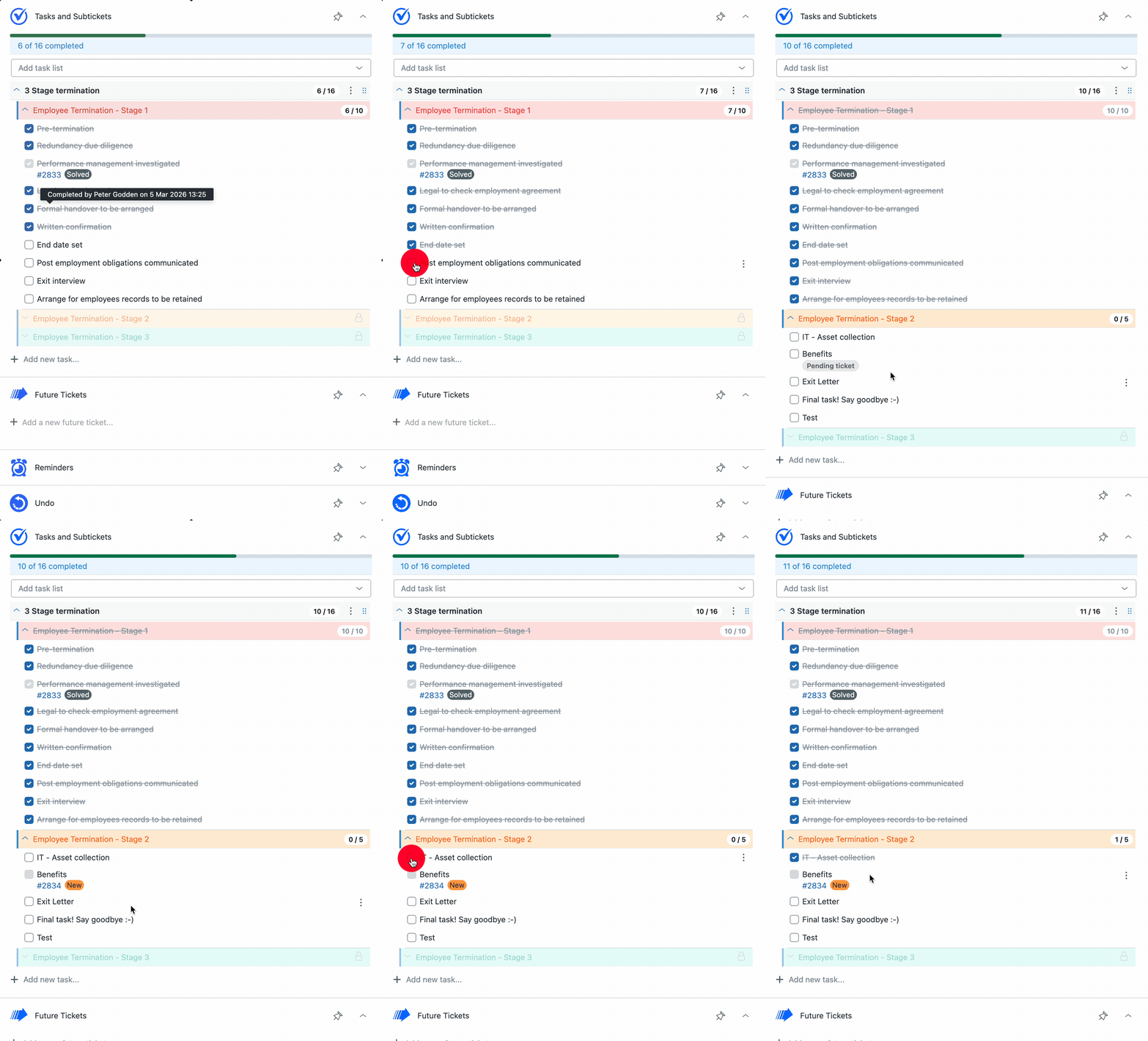
Multi-phase task lists organize tasks into logical, sequential stages rather than a single long checklist. Each phase represents a distinct process step, providing teams with a clear, structured path from beginning to end. The structure resembles book chapters: rather than processing overwhelming amounts of information at once, teams progress through one chapter sequentially, always understanding their position and what follows.
Real-World Use Cases
Customer Onboarding: Guide new customers through account setup, training, and go-live stages without initial overwhelm.
Compliance Training: Ensure employees complete foundational modules before accessing advanced content, maintaining audit-ready processes.
Employee Onboarding/Offboarding: Provide new hires with structured, welcoming experiences, and ensure proper protocols during departures.
Product Launches: Coordinate pre-launch, launch day, and post-launch tasks across teams with defined phase ownership.
Optional Sequential Locking to Enforce the Process
Multi-phase task lists feature optional sequential locking. When enabled, users must complete all tasks within a phase before accessing the next phase. This approach ensures process compliance and eliminates accidental or rushed step-skipping. The feature proves particularly valuable in regulated industries where operational order matters significantly.
Less Overwhelm, More Momentum
Breaking large workflows into digestible phases clarifies immediate focus for teams. Completed phases feel rewarding, upcoming phases build anticipation, and the entire process becomes followable rather than dreaded.
Get Started Today
Multi-Phase Task Lists are now available in Tasks & Subtickets, with configuration options in task list settings.
Get the latest from SweetHawk
Product updates, new features, and Zendesk tips. No spam, unsubscribe any time.